
Updated 24 Nov 2026 What changed
- Published. Facts rechecked against our own PS5 footage; added a later-session two-star HUD sighting and a criminal-profile tip; draft-only wording removed.
- Draft for review, from our own play on 19 November 2026. Not published.
On this page
This is a first-hand look at GTA 6's wanted level and police heat, from our own PS5 play on the night of 19 November 2026. The first wanted level we can show you does not come from the earlier free-roam drive around Key Lento — that session never picked up a star — but from a later night in the city.
It is a systems guide, not a crime guide. We do not describe how the chase started, because that is not clear on the stills we have, and we are not going to invent it. We also do not walk through evading police as a technique list. What follows is what the game put on screen after a crime had already been reported.
The first tip: hide, or leave the search area
Once we were wanted, a tutorial tip appeared:
“Lose the cops ★ by hiding or escaping their search area.”
On the same frame, “Crime reported” was up on the right, and wanted icons sat in the top-right of the HUD (a star, with vehicle and person markers). We were in the Ganado, in a city street at night, with a GPS prompt still on screen. We are not identifying the street as a “best escape route.” The useful part is the instruction itself: the game talks about a search area, not only a star you outrun in a straight line.
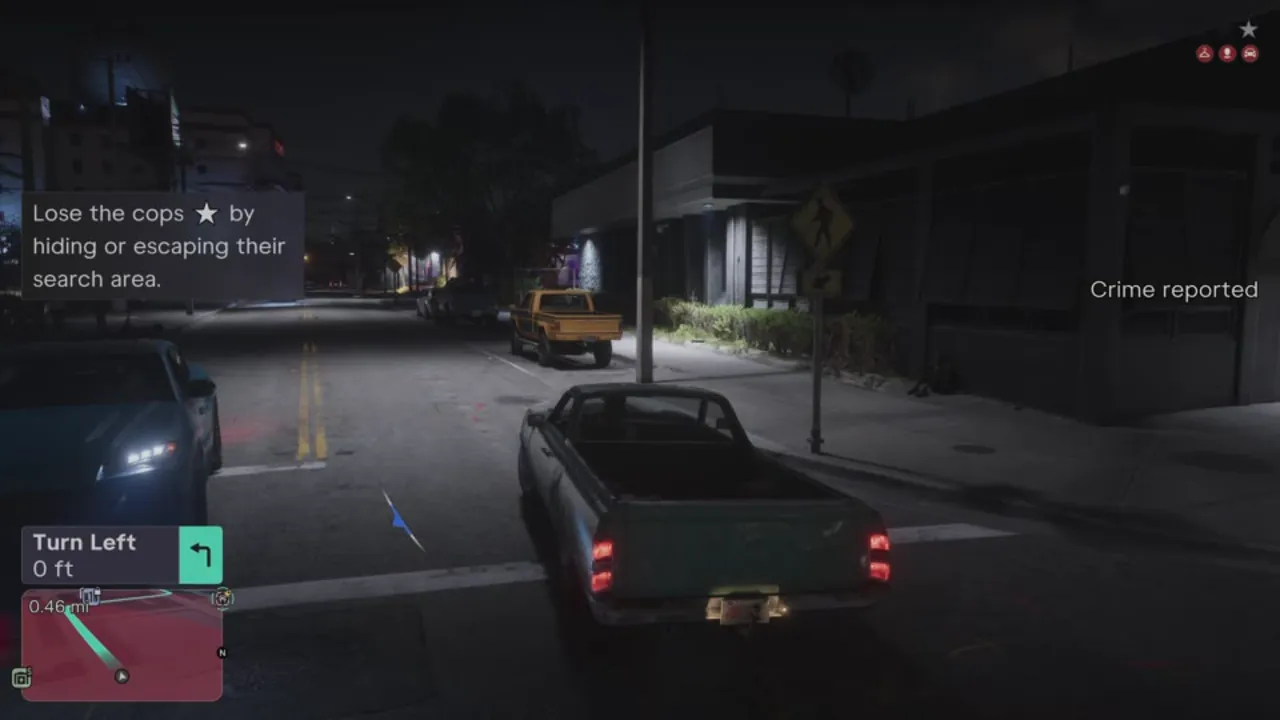
That is the first hard fact. Everything else we saw sits under it.
The pause map draws a red search zone
A couple of minutes later we opened the pause map. It was 2:50am, cash still $100. A red overlay covered a neighbourhood, and a tooltip said:
“The cops are actively looking for you in this area.”
Under that line were three flags, all marked:
- Vehicle known
- Appearance known
- Outfit known
The map itself was the pause-map UI, on the Map tab (the top row is Jason & Lucia / Map / Brief / Progress). In the corner of that frame the street label was NE 3rd St; nearby, in the same session, we also saw NE 1st Ave. Treat those as the streets that happened to be under the overlay, not as a recommended hiding place.
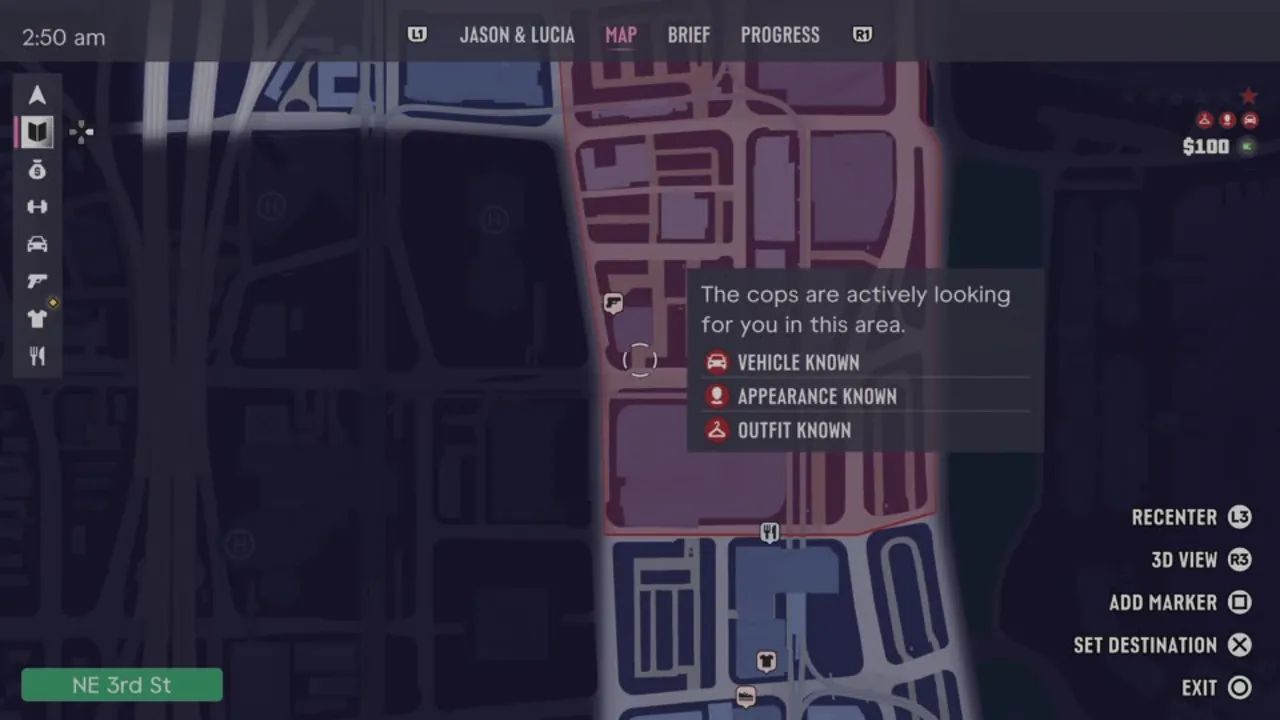
This is a screenshot of the wanted overlay from our play, used to show those three flags. It is not a copy of the map for navigation; for places we have actually been, use our interactive map.
What we can and cannot say about those three flags
The labels are clear, and they were all active at the same time in this chase. That is as far as the evidence goes.
We have not tested, in footage we can publish:
- whether changing outfit clears Outfit known
- whether ditching the Ganado clears Vehicle known
- whether Appearance known is tied to a character model, a haircut, or something else (we had a haircut earlier in the day, but not during this chase)
- how long the red zone lasts, or whether it shrinks
- how the wanted star on the HUD relates to the overlay — we saw a star in this city-night session. In a later session we did see two stars on the HUD, so more than one star is possible. We have not mapped what changes at each level, and we are not recapping that outing
Until we have stills of those tests, treat any advice you read elsewhere about “just change clothes” as unconfirmed here.
Police as a landmark, not a walkthrough
During the same city stretch we drove past the Vice-Dale Police Department. We have an exterior pass only, and we are using it as a landmark name, not as a place to go. We did not film an arrest, a bust, or an interior.
We also have not confirmed how wanted level interacts with:
- criminal profile (a story-adjacent tip in an earlier session said indiscriminate violence pushes you toward a violent criminal profile; we are not recapping that scene. In a later session a tip said getting a wanted level doesn’t affect your criminal profile, but how you choose to deal with the cops will. We have not seen a full profile breakdown in a menu we can quote for this page)
- entering a shop or the house while wanted
- swapping character
- paying a bribe, a ticket, or a wanted-clearing service — not seen
What we did not see in the first free-roam session
It is worth saying this plainly, because the first hour and the first Key Lento drive can feel quiet. In the 55-minute free-roam clip from earlier that day, we did not get a wanted level and did not see a police chase. If your first hour is the same, that matches our experience. Heat is in the game; we simply had not tripped it yet.
What we still need more footage for
- How a wanted level is first applied, and how it is shown the moment a star is earned (the crime that started this chase is not clear on our 5-second stills).
- What changes at each wanted-star level. We have since seen two stars on the HUD in a later session, but we have not mapped the ladder.
- How you know the search has ended (a toast, a disappearing overlay, a HUD change).
- Whether the three “known” flags can be cleared one by one.
- Arrests, wanted-level payoffs, and police interiors.
- How heat behaves outside the city — we have not been wanted on the keys or on I-97 in the footage reviewed for this page.
We will update this page when we have those sessions. We will not fill the gaps with guesses.
If you want the driving context around this chase, or the cash we had in our pocket at the time, the driving guide and money guide cover those systems without turning this into a crime how-to.
Frequently asked questions
How do you lose the cops in GTA 6?
The tip we were given was: lose the cops by hiding or escaping their search area. The pause map showed a red zone with the line, “The cops are actively looking for you in this area.”
What do Vehicle known, Appearance known and Outfit known mean?
They appeared as three flags on the wanted-area tooltip on the pause map in our session. We have not yet tested what happens if you change clothes, change cars, or hide long enough for a flag to clear, so we are not going beyond what the screen showed.
Is this a guide to committing crimes?
No. This page only describes the wanted-level interface we saw after a crime had already been reported. We do not explain how to start a chase or how to commit a crime.
Email alerts
Get told the moment it's official
No spam and no daily digest. Just one email when something on your list is confirmed.